Step 1: Upload or Paste Your Reference Photo
Choose a file, drag and drop it onto the page, or paste an image straight from your clipboard. JPG, PNG, WEBP and GIF are all supported, and your photo never leaves your device.
Add a grid overlay to any photo and draw it square by square. Free, no sign-up, and it runs right in your browser.
or drop an image here, , or
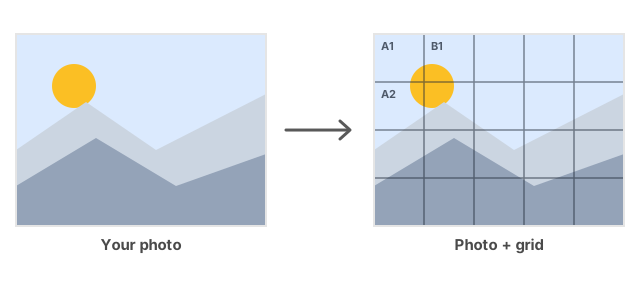
Switch on labeled cells and every square gets a coordinate like A1 or B2, so matching each square to your canvas is effortless. Scale the label size from 25% to 200% so they stay readable on small sketches and large prints alike.
Add diagonal cross lines through each cell to form an X. They make it far easier to judge slopes, tilts and curves — ideal for faces, figures and anything that does not line up neatly with the grid.
Convert any photo into a clean line drawing that shows only its main edges and contours. Adjust the thresholds and blur to control how much detail you keep — perfect for contour drawing and studying structure.
Pick your paper size and Grid Maker calculates the exact spacing in millimetres between every line, so you can recreate the same grid on real paper with a ruler. Custom sizes up to 2000 mm are supported too.
Set anything from a quick 4x4 to a detailed 30x30 grid, then fine-tune line colour, thickness and opacity so the overlay sits clearly on top of your image without hiding it.
Desaturate your reference in one tap to remove colour and read values more accurately. Combine it with edge detection for a stripped-back outline study.
Hide the photo and keep just the grid on a white background, then download or print a blank grid template to draw on directly. In this mode you can also export crisp, scalable SVG.
Lock every cell to a perfect square no matter your image shape, so proportions stay consistent across the whole drawing.
The grid method is a simple, time-tested way to copy or scale any image accurately. Here is how to do it with Grid Maker in five steps.
Choose a file, drag and drop it onto the page, or paste an image straight from your clipboard. JPG, PNG, WEBP and GIF are all supported, and your photo never leaves your device.
Set the number of rows and columns. Start with 8x8 or 10x10 for portraits, go higher for detailed work, or lower for quick gesture sketches.
Adjust colour, thickness and opacity, then switch on labels, cross lines, grayscale or edge detection until the reference is easy to read.
Select your paper size to see the precise line spacing in millimetres, then draw the matching grid on your canvas or paper with a ruler.
Export your gridded reference as PNG, JPG or SVG at full resolution with no watermark, then work square by square to transfer the image with accurate proportions.
The grid method breaks a complex image into small, manageable squares. By focusing on one square at a time and copying exactly what you see, you reproduce shapes and proportions accurately without freehand guesswork.
Because the grid is proportional, you can enlarge a small reference onto a big canvas, or shrink it, simply by drawing a grid with the same number of squares. Every square keeps its relative size and position.
A trusted technique used by artists from Albrecht Durer to today’s illustrators, the grid method trains your eye while guaranteeing accuracy. It works for portraits, landscapes, murals, digital art and classroom teaching.
Grid Maker is a free online tool that adds a grid overlay to any photo so you can draw it accurately using the grid method. It includes numbered labels, cross lines, edge detection and printable paper measurements.
Yes. Grid Maker is completely free with no signup, no watermark and no limits. You can create and download as many gridded images as you like.
Upload, drag and drop, or paste your image, then set the number of rows and columns. The grid appears instantly and you can download the result as PNG, JPG or SVG.
The grid method divides a reference image into equal squares so you can copy it one square at a time. It is a reliable way to capture correct proportions and to scale a drawing up or down.
An 8x8 or 10x10 grid works well for most portraits. Use more squares (20-30) for highly detailed work and fewer (4-6) for fast sketches.
Yes. Turn on Grid-Only mode to hide the photo and keep just the grid on a white background, then print or download a blank template, including as scalable SVG.
Cross lines add diagonals through each cell, making it easier to judge angles, slopes and curves that do not align with the straight grid lines.
Edge detection converts your photo into a simplified outline showing only its main contours. You can adjust the thresholds and blur to keep more or less detail.
Yes. All processing happens locally in your browser, so your photos are never uploaded to a server.
You can upload JPG, PNG, WEBP and GIF, and download your gridded image as JPEG, PNG or SVG (SVG is available in Grid-Only mode).
Yes. It works in any modern mobile browser on iPhone, Android and tablets, with touch-friendly controls.
Draw a grid with the same number of squares on your larger canvas. Because the squares stay proportional, copying each one transfers the image at the new size with correct proportions.
Yes. Download the gridded reference and drop it into Procreate, Photoshop, Clip Studio Paint or any app as a layer to guide your digital drawing.
Grid Maker provides exact line spacing for A2, A3, A4, A5, Letter and Legal, plus custom dimensions up to 2000 mm.